Class 67. Explosion Part 3

Class 67. Explosion Part 3

▶ Watch Video Tutorial

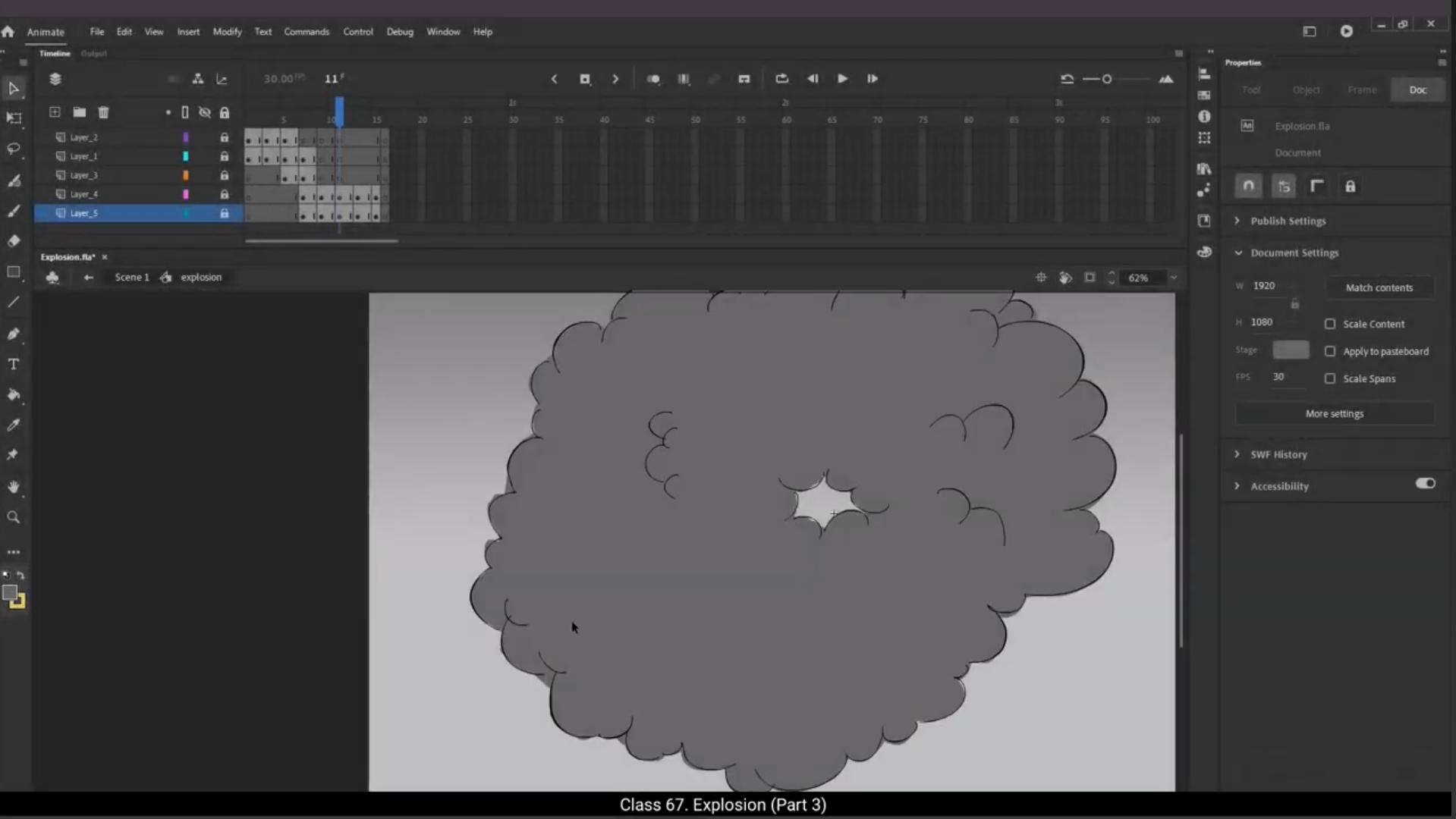
Welcome to Part 3. In this part of the tutorial we are going to add the in between drawings for the key drawings that we've done in the earlier part. This will make our animation much smoother, especially the smoke dissipation part. Now what we are going to do is make changes to the timings. We will need to keep the flashing light key drawings on one and the smoke drawings on 2. Which means each flashing light drawing will be seen for only one frame and each smoke drawing will be seen for only 2 frames. So we make the changes to the flashing light and before we move ahead we need to keep in mind that we are going to add in between drawings to the smoke. so When we adjust the timing for the smoke, we need to add 2 frames using F5 between two key frames of the smoke animation.This way, for now, each key drawing for the smoke animation will be held for four frames. We will then add the in betweens and then all the smoke drawings will be on twos. We can see how we paint the in between drawings that we have done in the earlier part using the brush tool.Please feel free to choose the brush size that suits you best when painting. We've already seen where we can adjust the brush size several times, so you shouldn't have any trouble locating it. Please complete the painting of all the in between drawings so that we will be able to see a preview of the entire explosion animation. Once all the drawings are painted. Let's do a preview using Control Enter to take a look at our explosion animation. It's working very nicely. Hope you find this tutorial helpful. Thank you for watching.


Part 3 में आपका स्वागत है। इस ट्यूटोरियल के इस हिस्से में हम पहले वाले भाग में बनाए हुए key drawings के बीच वाले drawings add करने वाले हैं। इससे हमारी animation और ज्यादा smooth हो जाएगी, खासकर smoke dissipation वाला हिस्सा। अब हम timings में बदलाव करने वाले हैं। हमें flashing light वाले key drawings को ones पर और smoke वाले drawings को twos पर रखना है। इसका मतलब ये हुआ कि हर flashing light drawing सिर्फ एक frame के लिए दिखेगी और smoke drawing दो frames के लिए। तो हम flashing light में timing का बदलाव कर देते हैं और आगे बढ़ने से पहले ये ध्यान रखना है कि हम smoke में in between drawings भी add करने वाले हैं। जब हम smoke की timing adjust करें, तो हमें दो key frames के बीच में 2 frames F5 से add करने होंगे। इस तरह अभी के लिए हर smoke key drawing चार frames तक hold होगी। फिर हम in betweens add करेंगे और तब सभी smoke drawings twos पर होंगी। हम brush tool का इस्तेमाल करके पहले वाले भाग में बनाए गए in between drawings को paint करते हैं। Brush size अपनी सुविधा के हिसाब से चुन सकते हैं। हमने brush size कहां adjust करना है, ये कई बार देख लिया है, इसलिए इसे ढूंढने में कोई दिक्कत नहीं होनी चाहिए। सभी in between drawings को paint कर लें ताकि हम पूरी explosion animation का preview देख सकें। जब सारी drawings paint हो जाएं, तो Control Enter से preview करके explosion animation देख लेते हैं। ये बहुत अच्छे से काम कर रही है। उम्मीद है कि आपको यह tutorial मददगार लगा होगा। देखने के लिए धन्यवाद।

▶ Watch Video Tutorial

Related Lessons

Free Course Blog

📚 Free Course Blog

Class 1. Course Introduction
Class 2. Adobe Animate CC software information
Class 3. Tools-and-properties-part-1
Class 4.Tools and properties.
Class 5. Gradient tool
Class 6. Timeline
Class 7. Properties tab
Class 8. Layers
Class 9. Groups and symbols
Class 10. Types of symbols
Class 11. Types of tweens
Class 12. Masking tools
Class 13. Motion guide
Class 14. Camera tool
Class 15. Nature BG vector and rigging
Class 16. Animation principles squash and stretch.
Class 17. Anticipation arc.
Class 18. Staging.
Class 19. Slow in and Slow out.
Class 20. Straight ahead and Pose to Pose.
Class 21. Exaggeration solid drawing.
Class 22. Text animation.
Class 23. Image animations and transitions.
Class 24. Rorating ball animation.
Class 25.Animate water in photo.
Class 26. Car shine effect animation.
Class 27. Windmill animation.
Class 28. Alarm clock animation.
Class 29. Ceiling fan animation.
Class 30. Rotating globe animation.
Class 31. Sunrise animation.
Class 32. Car animation with BG pan.
Class 33. Butterfly Animation.
Class 34. Halloween pumpkin glowing animation.
Class 35. BG parallax animation.
Class 36. Box animation.
Class 37. Waving flag animation using shape teeen.
Class 38. Worm walk animation.
Class 39. Pot breaking animation.
Class 40. Skiing man animation.
Class 41. Fluttering flag animation.
Class 42. Bursting bubbles animation.
Class 43. Melting Ice-cream animation.
Class 44. Coin rotation animation.
Class 45. Hanging shirt in wind animation.
Class 46. Flying bird animation.
Class 47. Export animation as image or video.
Class 48. Candle flame animation.
Class 49. Campfire animation.
Class 50. Smoke animation.
Class 51. Sea wave animation.
Class 52. Rain animation.
Class 53. Hosepipe animation.
Class 54. Fountain animation.
Class 55. Waterfall animation.
Class 56. Bubbles animation.
Class 57. Glowing sun animation.
Class 58. Lightning animation.
Class 59. Sword gleam animation.
Class 60. Jewelry glint animation.
Class 61. Window glass crack animation.
Class 62. Lightning and rain animation.
Class 63. Ripples and splash ( Part 1 ).
Class 64. Ripples and splash ( Part 2 ).
Class 65. Explosion ( Part 1 ).
Class 66. Explosion ( Part 2 ).
Class 67. Explosion ( part 3 ).
Class 68. Box animation.
Class 69. Building animation.
Class 70. Rotating globe animation.
Class 71. Character front dissection and rigging dvance.
Class 72. Character 3 4th front dissection and rigging.
Class 73. Llips drawing front.
Class 74. Facial expressions drawing.
Class 75. Animate character eye blink.
Class 76. Animate character dialogue with lip-sync.
Class 77. Animate character hand gestures.
Class 78. Animate character facial expressions.
Class 79. Animate character head turn.
Class 80. Character profile view walk side angle.
Class 81. Character 3-4th angle walk.
Class 82. Character profile view run side angle.
Class 83. Character 3-4th angle run.
Class 84. Introduction to bone tool.
Class 85. Happy walk (part 01 ).
Class 86. Happy walk ( part 02 ).
Class 87. Happy walk ( part 03 ).
Class 88. Sad walk ( part 01 ).
Class 89.Sad walk ( part 02 ).
Class 90. Sad walk ( part 03 ).
Class 91. Angry walk ( part 01 ).
Class 92. Angry walk ( part 02 ).
Class 93. Angry walk ( part 03 ).
Class 94. Sneak walk ( part 01 ).
Class 95. Sneak walk ( part 02 ).
Class 96. Sneak walk ( part 03 ).
Class 97. Dreamy walk ( part 01 ).
Class 98. Dreamy walk ( part 02 )
Class 99. Dreamy walk ( part 03 ).
Class 100. Smug walk ( part 01 ).
Class 101. Smug walk ( part 02 ).
Class 102. Smug walk ( part 03 ).
Class 103. Scared walk ( part 01 ).
Class 104. Scared walk ( part 02 ).
Class 105. Scared walk ( part 03 ).
Class 106. Happy walk 3-4th-angle.
Class 107. Sad walk 3-4th angle.
Class 108. Angry walk 3-4th angle.
Class 109. Sneak walk 3-4th angle.
Class 110. Dreamy walk 3-4th angle.
Class 111. Smug walk 3-4th angle.
Class 112. Scared walk 3-4th angle.
Class 113. Scared run profile.
Class 114. Tip toe run profile.
Class 115. Jog profile.
Class 116. Scared run 3-4th.
Class 117. Tip toe run 3-4th.
Class 118. Jog 3-4th.
Class 119. Horse walk part-01.
Class 120. Horse walk part-02.
Class 121. Horse-trot.
Class 122. Dog walk part-01.
Class 123. Dog walk part-02.
Class 124. Cat walk part-01.
Class 125. Cat walk part-02.
Class 126. Camel walk.
Class 127. Grizzly bear walk.
Class 128. Mouse walk.
Class 129. Horse gallop.
Class 130. Lioness run.
Class 131. Grizzly bear run.
Class 132.
Class 133.